 Plonk
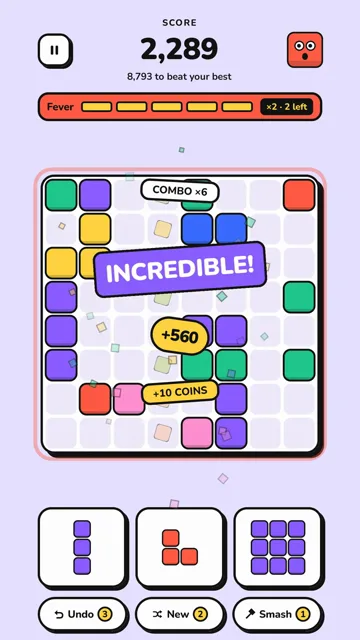
To find Android games that really work without Wi-Fi, check that every mode plays offline, then test the game yourself in airplane mode. Our two free games, Plonk and Meow Jar, play fully offline with no account. Here is what to check, and the one-minute test.
The short answer
Puzzle, word, card and number games are the kinds that most often work offline, because they do not depend on other players or live content. Before you rely on one, check that every mode plays without a connection, that it needs no account, and that progress saves on the phone.
The quickest test: open the game once on Wi-Fi, close it, turn on airplane mode with Wi-Fi off, and play every mode you care about. Our games Plonk (a block puzzle) and Meow Jar (a cat merge game) are free and pass that test in every mode.
Why offline games are worth having
- Commutes. Trains, buses and the subway often have patchy signal, and a game that stalls while loading is no fun.
- Flights. In airplane mode, only games that truly run offline will open.
- Data limits. A game that doesn't need a connection doesn't use your mobile data while you play.
- Kids on a trip. A game that works without internet, with no account and nothing to buy, is easier to hand over in the back seat. Check the age rating on the store page first.
- Places with no signal. Camping, the countryside, or a basement waiting room.
What to check before you install
- Is every mode offline? Some games play offline for one mode only, while daily challenges, events or multiplayer need a connection. Read the listing for words like "every mode" or "no Wi-Fi needed".
- How ads work. Ads need a connection to load. In some games, missing ads can block rewards or even stop the game from starting. Games where videos are optional and only play when you choose one are the safest offline.
- Account requirements. A game that asks you to sign in before you can play may not open without internet. A game with no account at all avoids that.
- Where progress is saved. Progress saved on the phone works anywhere. Progress saved only on a server may not.
- Download size and extra downloads. Some games download more content after the first launch, so open the game once on Wi-Fi before you leave.
- Battery use. Simple puzzle games are usually lighter on the battery than big 3D games, which matters on a long trip.
Our offline games: Plonk and Meow Jar
We make two free games for Android. Both need no account and no internet connection to play, and both save your progress on your phone.
| Plonk | Meow Jar | |
|---|---|---|
| What it is | A block puzzle on an 8×8 board: fill rows and columns to pop them | A cat merge game: drop cats into a jar and merge matching ones |
| Modes | Endless Classic, 100 Adventure levels, a Daily puzzle | Classic, Adventure (45 levels), Daily Jar, Power Jar, Zen |
| Offline | Every mode works without Wi-Fi or data | Plays fully offline, no Wi-Fi needed |
| Saving | Progress saves after every move | Saves automatically, and a backup code moves it to a new phone |
| Ads | Only optional short videos you choose to watch | No banners or forced ads, only optional short videos |
| Languages | 18 | 9 |
The optional reward videos are the only part of either game that needs a connection. If you are offline, the video simply isn't available, and the game itself keeps working. Read more about Plonk and about Meow Jar, or see all our games.
Kinds of games that often work offline
Plenty of other offline games exist. These are the kinds that most often run without a connection, because they don't depend on other players or live content:
- Puzzle games. Block puzzles, merge games, sliding puzzles and logic grids are usually self-contained.
- Word games. Crosswords, word searches and anagram games often ship with their word lists on the phone.
- Card and board games. Solitaire, chess against the computer and similar games play well alone.
- Number games. Sudoku, nonograms and 2048-style games need nothing but the puzzle.
- Single-player arcade and platform games. Many work offline, though some lock levels or rewards behind a connection.
Online-first games, such as multiplayer battles or games with live events, usually need a connection, even when part of them works offline.
How to check if any game works offline
The airplane mode test takes a minute and tells you more than any listing:
- Open the game once on Wi-Fi. Let it finish any first-time download.
- Close it fully. Swipe it away from your recent apps so it starts fresh.
- Turn on airplane mode. Make sure Wi-Fi is off too, since some phones keep it on in airplane mode.
- Open the game and play every mode you care about. Check that daily puzzles, levels and saving still work.
- Close and reopen it. Confirm your progress is still there.
If the game shows a loading screen that never ends, or asks you to connect, it is not fully offline.
Quick answers
What are good offline games for Android?
Puzzle, word, card and number games are the kinds that most often work without internet. Our own games, Plonk (a block puzzle) and Meow Jar (a cat merge game), are free on Google Play and play offline with no account.
How can I tell if a game works offline?
Open it once on Wi-Fi, close it, turn on airplane mode with Wi-Fi off, and play every mode you care about. Then close and reopen it to check that your progress saved.
Do offline games still show ads?
Some do when you are back online. Ads need a connection to load. In Plonk and Meow Jar the only ads are optional short videos you choose to watch, and the games themselves work without a connection.
Do Plonk and Meow Jar need an account?
No. Neither game needs an account or a sign-in. Your progress saves on your phone.
Are Plonk and Meow Jar on iPhone?
Not at the moment. Both games are available for Android on Google Play.
Read next

Try it yourselfPlonk is free on Google Play.