 Kind PDF
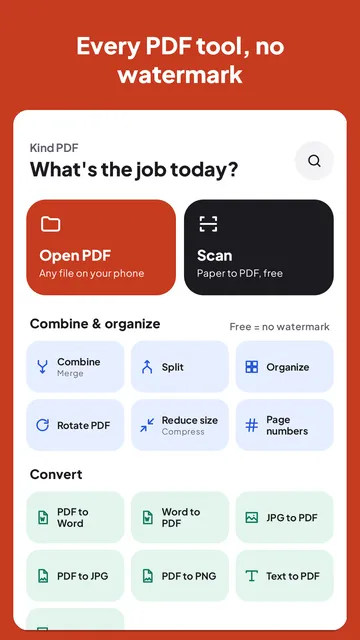
To compress a PDF on Android, open it in an app that can reduce its size, pick Medium quality for email and most forms (or Low for strict limits), and save the smaller copy. Kind PDF does this free, offline and without a watermark. Here are the steps and which setting to choose.
The short answer
Open the PDF in a compressor app, choose a quality, and save the smaller copy. Medium quality (images at about 120 dpi) suits email and most upload forms; Low (about 72 dpi) makes the smallest file for strict limits; High (about 200 dpi) is for printing.
Scans and photo-heavy PDFs shrink the most, because images are what make a PDF big; text-only PDFs barely shrink. If the file is still too big, keep only the pages you need or split it. Kind PDF compresses on your phone, so the file is never uploaded. In a browser, our Compress PDF tool lets you pick an exact size, with ready-made pages to compress a PDF to 100 KB or to 1 MB.
Why some PDFs are so big
Text barely weighs anything in a PDF. Images do. A 20-page report exported from Word can be a few hundred kilobytes, while the same pages scanned with a phone camera can be tens of megabytes, because every page is a large photo.
So compressing a PDF mostly means shrinking the images inside it: storing them at a resolution that still looks sharp on screen and in print, with stronger JPEG compression.
Step by step with Kind PDF
Kind PDF compresses on your phone, so the file is never uploaded, and it adds no watermark.
- Open Reduce size. Tap Reduce size (Compress) on the home screen, or open the PDF and choose it from Tools for this file.
- Pick the PDF you want to shrink.
- Choose a quality. Low makes the smallest file, Medium is the balance most people want, High keeps images sharpest.
- Compare the sizes. Kind PDF shows the size before and after, so you know whether it now fits the limit.
- Save or share the smaller copy. Your original stays as it was.
Which quality should you pick?
| Setting | Images are stored at | Best for |
|---|---|---|
| Low | about 72 dpi | The smallest file: strict upload limits, reading on a phone |
| Medium | about 120 dpi | Email and most forms: still clear on screen |
| High | about 200 dpi | Printing or documents with small print in photos |
In the free version, Low and Medium have no limit; High is part of Pro. Text and vector drawings are never touched, so typed text stays perfectly sharp at every setting.
When compressing doesn't help
- The PDF is already compact. A text-only PDF has little to squeeze. If the file wouldn't shrink by at least 2%, Kind PDF says it's already compact instead of saving a copy that's no smaller.
- It's still too big. Split the PDF and send it in parts, or keep only the pages that are needed.
- You're scanning it now. Scanning straight to PDF with a cropped, cleaned page gives a smaller file than a full-resolution photo of the page.
Common size limits
Gmail lets you attach up to 25 MB per email. Job sites, school portals and government forms often set much lower limits, frequently somewhere between 1 and 10 MB, and the form usually says which. Medium quality brings most scanned documents under those limits.
Quick answers
How do I reduce a PDF's size on Android for free?
Open the PDF in a compressor that runs on the phone, such as Kind PDF, choose Reduce size, pick Low or Medium quality and save the smaller copy. Kind PDF shows the size before and after and adds no watermark.
Will compressing a PDF make it blurry?
Only the images inside the PDF are compressed. Typed text and vector drawings stay sharp at every setting. Low quality can make photos softer, so try Medium first.
Why is my scanned PDF so large?
Each scanned page is stored as a photo, and photos are much heavier than text. Compressing re-saves those photos at a lower resolution, which usually shrinks scans a lot.
Is my file uploaded when I compress it?
Not with Kind PDF. It compresses on your phone and never uploads your files, so it also works offline.
What if the PDF is still too big after compressing?
Split it into parts and send them separately, or keep only the pages that are needed. Kind PDF can split a PDF by page ranges.
Read next
Try it yourselfKind PDF is free on Google Play.