 Kind PDF
You can turn a PDF into an editable Word document (.docx) right on your Android phone. Here is how to do it, what comes out well, and why it matters where the conversion happens.
The short answer
Install a PDF to Word converter that runs on the phone, open your PDF in it, choose PDF to Word and save the .docx. You can then open the file in Microsoft Word, Google Docs or any app that edits .docx files.
Many free converters are websites that upload your PDF to a server, do the work there and send the result back. That works, but your document leaves your phone. For contracts, IDs, bank letters or school papers, a converter that works on the device is the safer choice.
Step by step with Kind PDF
Kind PDF is our free PDF app for Android. It converts on your phone, never uploads the file and adds no watermark.
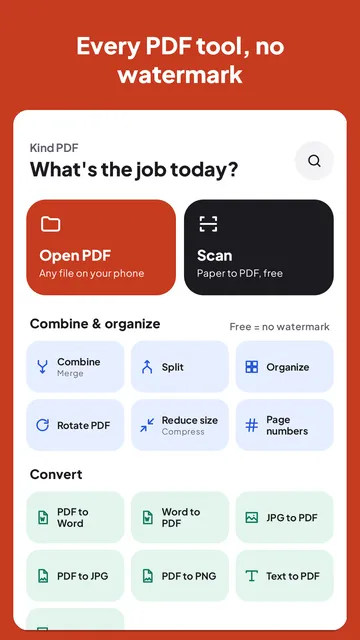
- Open the tool. Tap PDF to Word on the home screen. You can also open a PDF in the viewer and pick it from Tools for this file, or long-press the app icon for the PDF to Word shortcut.
- Pick your PDF. Choose it from your phone's files, Downloads or Drive.
- Check the free limit. The free version converts the first 5 pages of a file, and the app tells you before you start. The button says "Convert first 5 pages" when the file is longer.
- Scanned PDF? Turn on text recognition. If the first pages have no real text (a photo or scan), Kind PDF offers to read them with on-device OCR first, so you get editable words instead of pictures of words.
- Save or share the .docx. Open it, share it or save it where you like. Saving, opening and sharing are always free.
What converts well, and what needs a touch-up
A PDF stores where each letter sits on the page, not paragraphs and headings. A converter has to rebuild the document's structure from that. Here is what to expect from any PDF to Word conversion, including ours:
| Content | What to expect |
|---|---|
| Paragraphs and headings | Converts well: text flows as normal paragraphs, larger text becomes headings |
| Bold, italic and lists | Kept in most documents |
| Images | Kept, in reading order |
| Simple tables | Rebuilt as Word tables when the columns line up |
| Complex layouts | Forms, magazines and heavily designed pages may need a little tidying |
| Scanned pages | Need OCR first; accuracy depends on how sharp the scan is |
Tips for a cleaner result
- Start from the original PDF when you can. A PDF exported from Word or Google Docs converts far better than a scan of a printout.
- Scan flat and in good light. If the PDF is a scan, a sharp, straight page gives OCR much better text. Kind PDF's scanner finds the edges and cleans the page for you.
- Only need the text? PDF to Text is quicker and has no page limit in Kind PDF.
- Long document? Split it first and convert the part you need, or convert the first pages to check the result before you go further.
Going the other way: Word to PDF
Kind PDF also turns a .docx back into a PDF. Share a Word file to Kind PDF, or open it with Kind PDF, and it lands in Word to PDF with basic formatting. It's handy when a form or an application asks for a PDF.
Quick answers
Can I convert a PDF to Word on my phone for free?
Yes. Kind PDF converts PDF to Word on Android for free, with no watermark and no account. The free version converts the first 5 pages of each file and tells you before you start.
Is my PDF uploaded when I convert it?
Not with Kind PDF: the conversion runs on your phone and the file is never uploaded. Online converter websites usually do upload your file to their server.
Can I convert a scanned PDF to editable Word?
Yes. When the pages have no real text, Kind PDF can read them with on-device text recognition (OCR) first, so the Word file contains editable words. A sharp, straight scan gives the best result.
Does the Word file keep the formatting?
Paragraphs, headings, bold and italic text, lists, images and simple tables are kept in most documents. Complex layouts such as forms or magazine pages may need a little tidying afterwards.
Does converting a PDF to Word work offline?
Yes. Kind PDF runs the conversion on the phone, so it works without an internet connection.
Read next
Try it yourselfKind PDF is free on Google Play.